

Introduction
Most “best cheap tech gadgets” lists are just junk. Reality check: finding innovative gear that doesn’t break the bank is possible. Forget disposable trash. We focused on unique gifts under $50 that refine your everyday carry. These selections prioritize actual value – tools that solve real problems. No gimmicks, just smart design for your money.
TL;DR
| Gadget Name | Price | One-Sentence Benefit |
| Amazfit Band 7 | ~$50 | A feature-packed fitness tracker with 18-day battery life that rivals $200+ smartwatches. |
| Wacaco Minipresso | ~$46 | Hand-powered espresso maker for café-quality coffee anywhere – no electricity needed. |
| Wacom Intuos (Small) | ~$50 | The gold standard entry-level drawing tablet that works with your existing software. |
| Nitecore TINI 3 | ~$40 | A keychain-sized flashlight pumping out 600 lumens with an OLED display. |
| 8Bitdo SN30 Pro | ~$35-$45 | Retro-styled wireless controller that works with Switch, PC, Mac, and Android. |
Amazfit Band 7
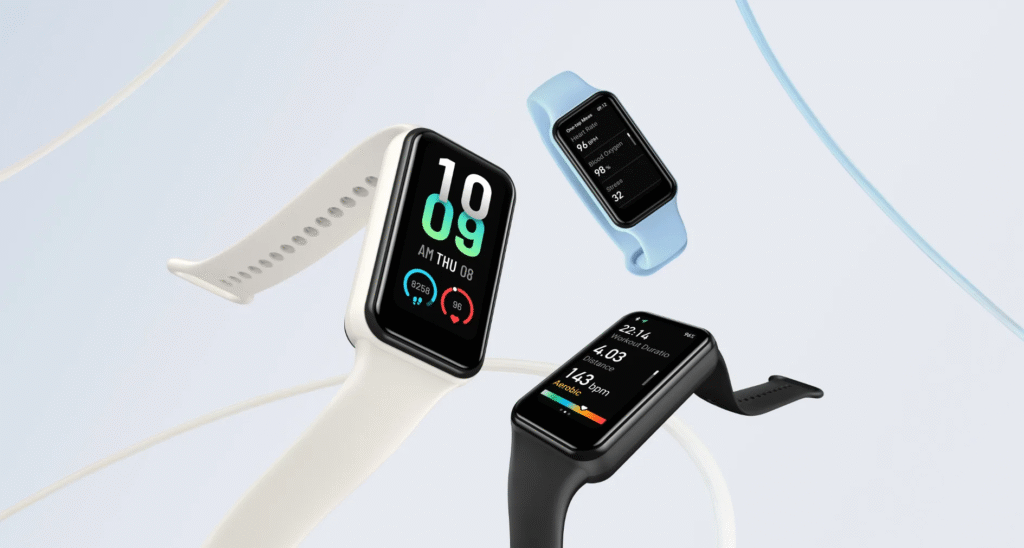
More Than Just a Step Counter
The Amazfit Band 7 punches way above its weight. That always-on AMOLED display – a 1.47-inch stunner – is legit impressive. Seriously bright, razor-sharp, and the battery doesn’t bail when you’re pushing hard. It’s a clear win: proof you can get legit useful tech under $50 without the usual compromises. They nailed the fundamentals.
Key Features & Specs Deep Dive
Here’s what you’re getting:
- Battery life: Up to 18 days on a single charge (yes, seriously)
- Health monitoring: SpO2 tracking, continuous heart rate, stress assessment in 45 seconds
- Sports modes: 120 different activities – from swimming to parkour
- Water resistance: 5 ATM rating, so shower away
- Smartphone sync: Get texts, calls, and app notifications on your wrist
The standout? That battery. While Apple Watch owners scramble for chargers daily, you’re set for almost three weeks.
Who Is This Gadget Perfect For?
Students, gym rats, and anyone who hates charging devices constantly. If you want fitness tracking without selling a kidney for an Apple Watch, this affordable gadget nails it.
Wacaco Minipresso
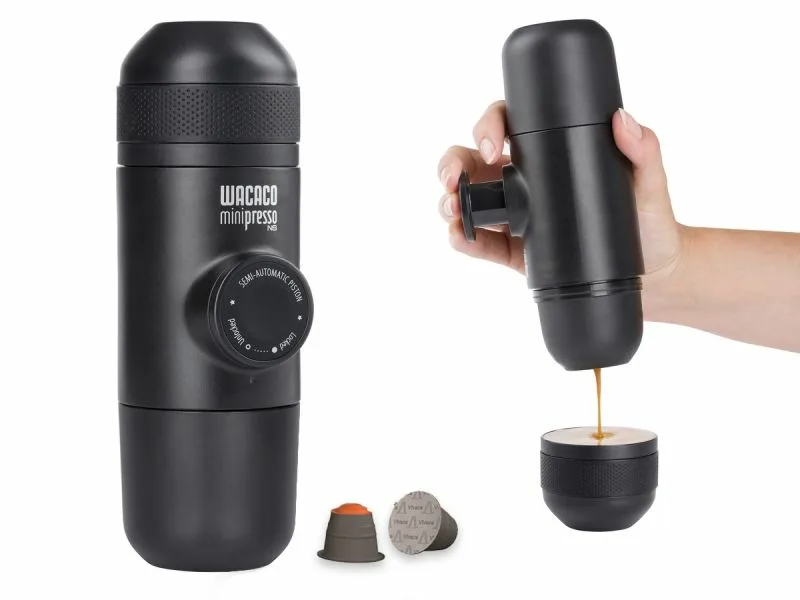
The Joy of Portable Espresso
Coffee snobs, pack this gadget next time you wander off-grid. The Wacaco Minipresso is a hand-powered espresso maker that relies on elbow grease, not outlets. Dump in your ground coffee, add hot water, and pump the lever. What you get is a legit shot of real espresso – anywhere. The manual control actually improves the ritual, turning pressure and timing into your own hands. No batteries, no bull. Just a concentrated, portable caffeine fix.
How It Works (The Simple Magic)
Operation is dead simple:
- Fill the water tank with hot water
- Add your favorite ground coffee (no pods, no waste)
- Pump the piston manually to build pressure
- Watch as legit espresso flows out
No batteries. No cords. Just you and your caffeine addiction, harmoniously united.
Ideal For: Travelers, Campers, and Office Desks
Road warriors love this thing. Camping enthusiasts swear by it. Even office workers use it to avoid that sad breakroom Keurig. At ~$46, it’s one of those unique gifts under $50 that actually gets used.
Wacom Intuos
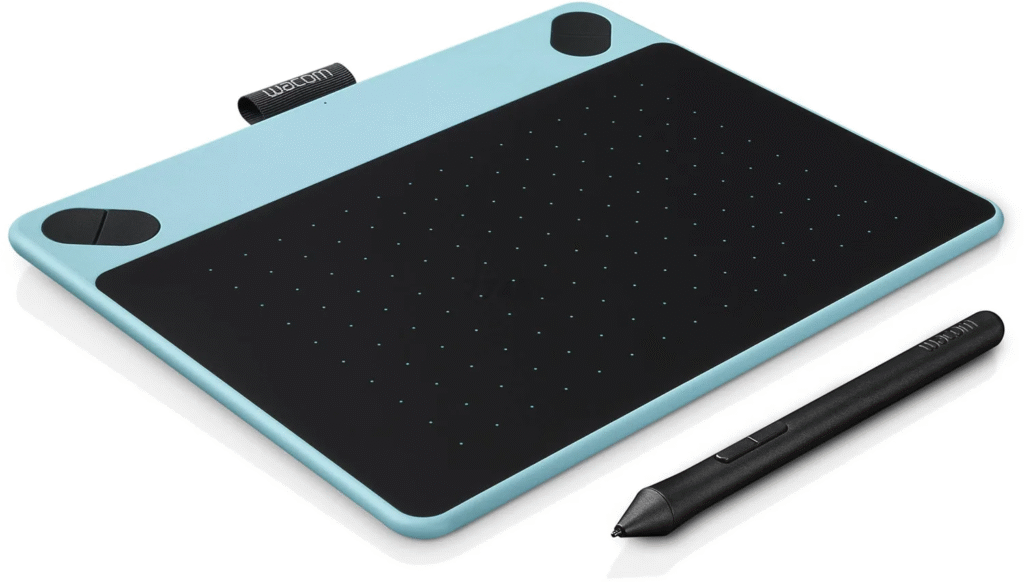
The Gold Standard for Beginners
Wacom Intuos is the tablet that launched a thousand digital art careers. It’s not fancy. It doesn’t have a screen. But it works flawlessly with Photoshop, Illustrator, Procreate – basically anything creative professionals use.
What’s in the Box & What Can You Create?
You get:
- Pressure-sensitive pen (battery-free, feels natural)
- Compatibility with Mac, PC, Chromebook, select Android devices
- Free software downloads for creative apps
- Online tutorials to get you started
Perfect for photo editing, graphic design, digital painting, or even remote schoolwork. The learning curve? Surprisingly gentle.
Why It’s a Better Investment Than a Cheap Stylus
Cheap styluses? Drawing with a frozen hot dog. The professional-quality work from a Wacom comes down to its 4,096 pressure levels. This isn’t just a number. Press hard for thick, opaque lines. Use a light touch for a faint sketch. That sensitivity gives you direct control – your hand’s nuance translates directly to the screen. Budget gadgets often force you to compensate for their limitations. Here, the tool gets out of your way. That’s the real shift from amateur hour: predictable, consistent response that lets skill, not hardware, set the limit. For critical work, that control is everything.
Nitecore TINI 3
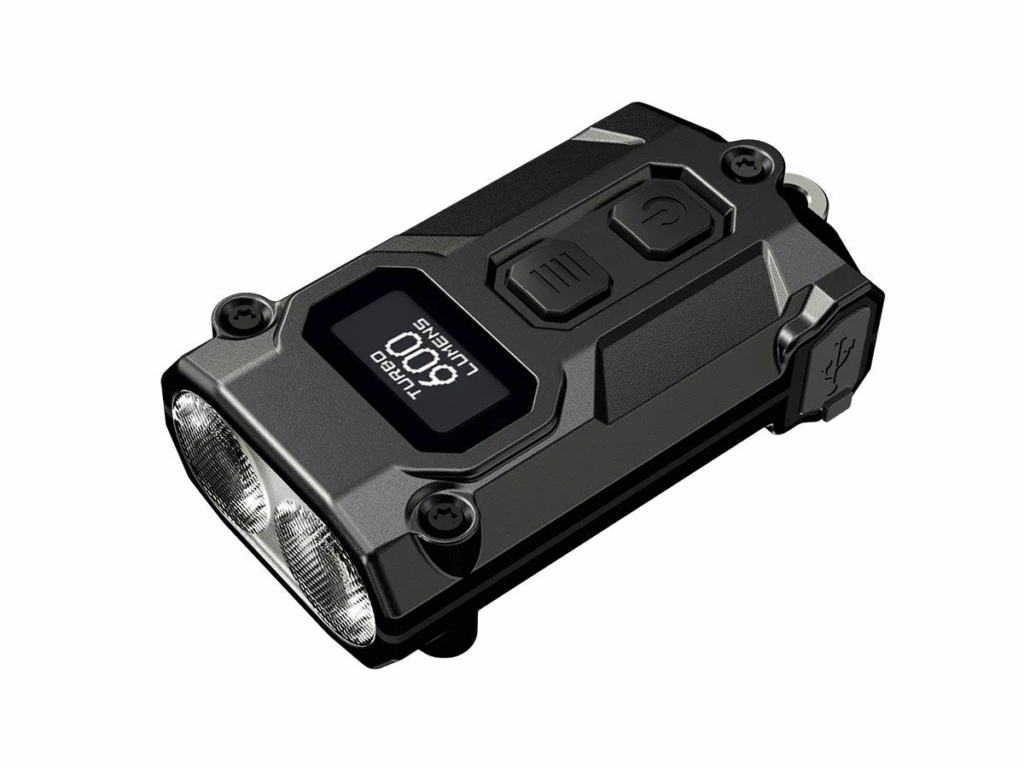
Small Size, Massive Performance
At 0.71 ounces, TINI 3 weighs less than your car keys. Yet it blasts 600 lumens on turbo mode – bright enough to light up a full basketball court. It’s absurd how much power fits in something this tiny.
Smart Features You Wouldn’t Expect
This isn’t your grandpa’s flashlight:
- OLED display showing battery percentage and current mode
- Three color temperatures: 3000K (warm), 4500K (neutral), 6500K (cool)
- Beam distance: 98 yards
- USB-C charging: Modern, fast, universal
The color temperature thing? Game-changer. Warm light for reading, cool light for search and rescue vibes.
An EDC (Everyday Carry) Essential
For ~$40, you’re getting a tool that earns its spot on your keychain. Power outages, late-night dog walks, fixing stuff under the sink – TINI 3 handles it all without adding bulk.
8Bitdo SN30 Pro
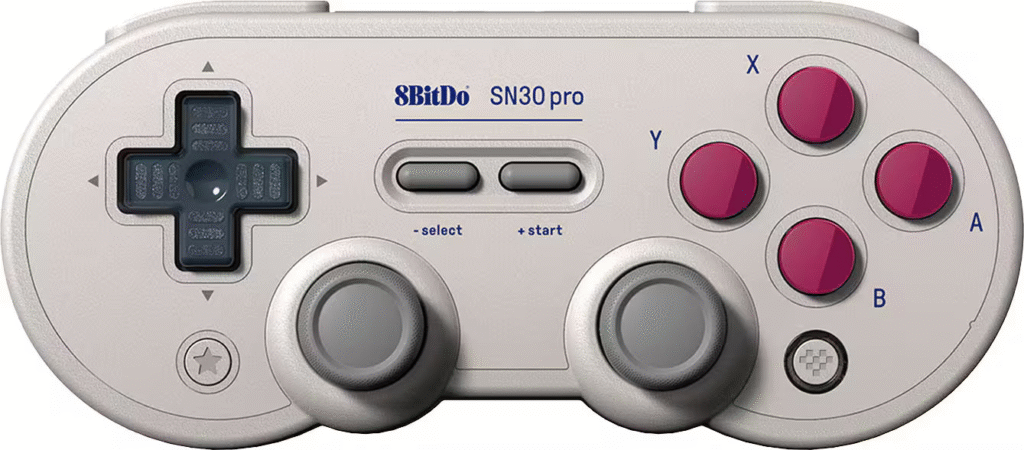
Retro Style Meets Modern Tech
Remember that chunky, colored Super Nintendo controller? 8Bitdo gutted it. They crammed in Bluetooth, slapped on modern analog sticks, and added rumble. Retro Style Meets Modern Tech isn’t just a slogan – it’s a working hybrid. This is nostalgia without the dust, rebuilt for 2026. You get the classic form, but none of the limitations.
Versatility Across Platforms
Works with:
- Nintendo Switch (perfect portable companion)
- Windows PC (Steam compatibility)
- macOS
- Android devices
Pair it via Bluetooth, update firmware if needed, and you’re gaming wirelessly across basically everything. Motion controls included for games that need them.
The Perfect Gift for Gamers
Priced between $35-$45, this controller hits sweet nostalgia buttons while being legitimately functional. Retro gamers lose their minds over it. Switch owners use it as their main controller. It’s one of those cheap tech gadgets that keeps giving.
Maximizing Your $50 Gadget Budget
Smart shopping tips:
- Check refurbished options: Many retailers sell certified refurbished tech at 20-30% off
- Wait for sales: Prime Day, Black Friday, end-of-quarter clearances
- Read actual user reviews: Skip 5-star spam, read 3-4 star reviews for honest takes
That last one’s key. Why pay $50 when a promo code drops it to $40?
FAQ
Are gadgets under $50 reliable, or will they break quickly?
Not always, but brands like Amazfit, Wacom, and 8Bitdo have good reputations. How? Stick with known names. Check warranty details, too. A budget device from a trusted company is often more reliable than a pricier knockoff. That’s a key nuance in finding value. You can harness real insights from user reviews. Well-crafted affordable tech does exist.
Can I find good smart home gadgets under $50?
You can find solid options under $50. Target single-purpose devices: smart plugs, basic security cameras, or LED light strips. Skip the multi-function hubs; they’re rarely budget-friendly. Focus instead on a specific need. A smart plug automates a lamp or coffee maker. A simple camera monitors a doorway. LED strips add mood lighting. You won’t get premium features, but you’ll score reliable function. For best value, check refurbished models or major sales events. The tech is mature enough that even budget brands often deliver decent performance for straightforward tasks.
Where is the best place to buy these affordable gadgets?
Best Buy, Amazon, and manufacturer sites usually have competitive pricing. Always check price comparison websites for active discount codes before checkout – sometimes you’ll snag an extra 10-20% off.
What should I look for when buying a budget gadget?
Key factors:
- User reviews (look for patterns in complaints)
- Warranty or return policy
- Brand reputation
- Actual specs vs. marketing hype
Are there good gaming gadgets under $50?
The 8Bitdo controller is a classic pick, but don’t stop there. Mechanical keyboard switches offer a cheap way to customize feel and sound. A solid gaming mouse pad isn’t just fabric – it’s consistent tracking. Even capture cards for basic streaming can fall under this budget now. The real shift? Today’s affordable peripherals are often modular entry points into hobbyist-grade setups, not just dead-end cheap gear. It’s about targeted upgrades.